
Efficient Roofing Documentation with CrewBox Pro | Roofing Software
Streamline roofing projects with CrewBox Pro, the Roofing Photo Documentation App for Roofers. Simplify workflow, improve communication, and enhance documentation seamlessly.
Roofing work depends on timing, communication, documentation, and follow-through. CrewBox Pro helps roofing teams think about those moving parts in one connected workflow, giving contractors a practical way to reduce confusion between the field and the office. For companies comparing roofing software, the goal is simple: spend less time chasing updates and more time completing quality work.
What makes roofing projects so hard to manage?
Roofing projects are hard to manage because the work rarely happens in a single place, at a single desk, or on a predictable schedule. Crews are on job sites, estimators are reviewing details, managers are coordinating materials, and customers often need timely updates. Without a reliable system, important information can get buried in text messages, paper notes, phone calls, photo folders, and disconnected spreadsheets.
That scattered process creates friction. A missing photo can slow down a roof report. A delayed update can leave the office unsure whether a crew finished a task. A misplaced measurement, material note, or service request can turn into rework. For growing roofing businesses, even small communication gaps can affect scheduling, customer experience, and profitability.
This is where a dedicated roofing app can make a meaningful difference. Instead of forcing teams to rely on memory or fragmented tools, software for roofers gives everyone a clearer place to document work, review progress, and keep projects moving.
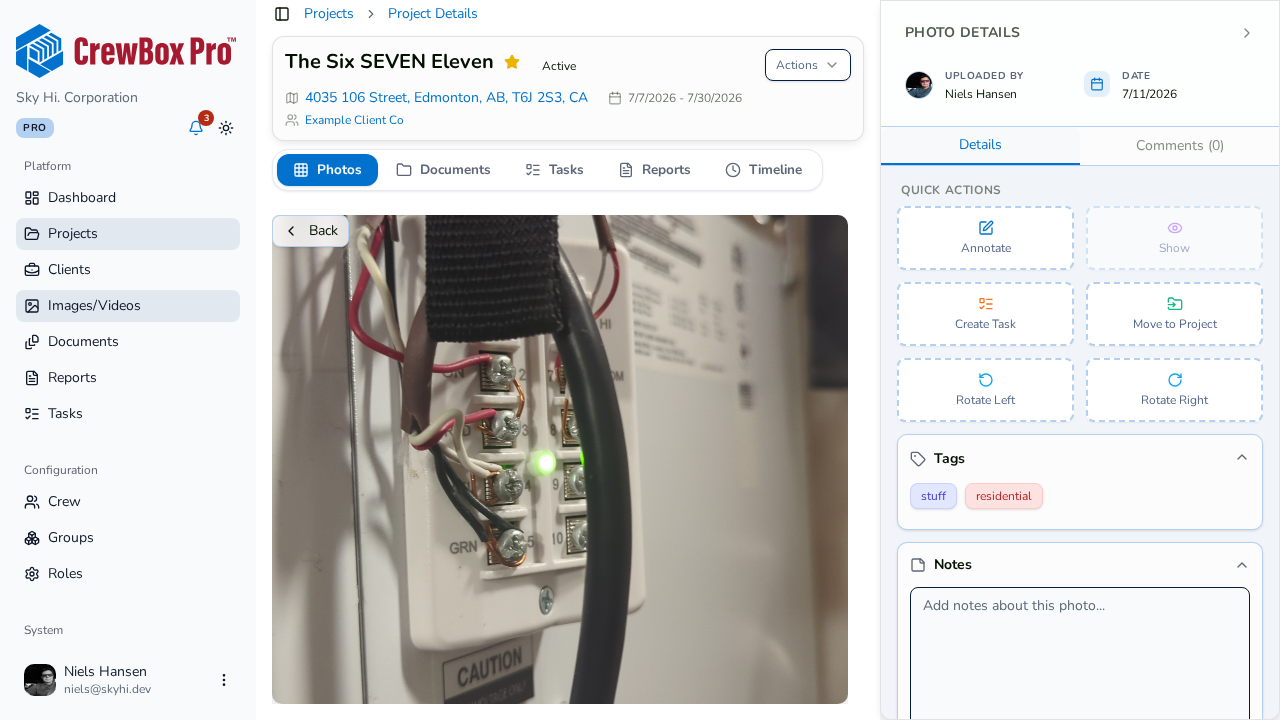
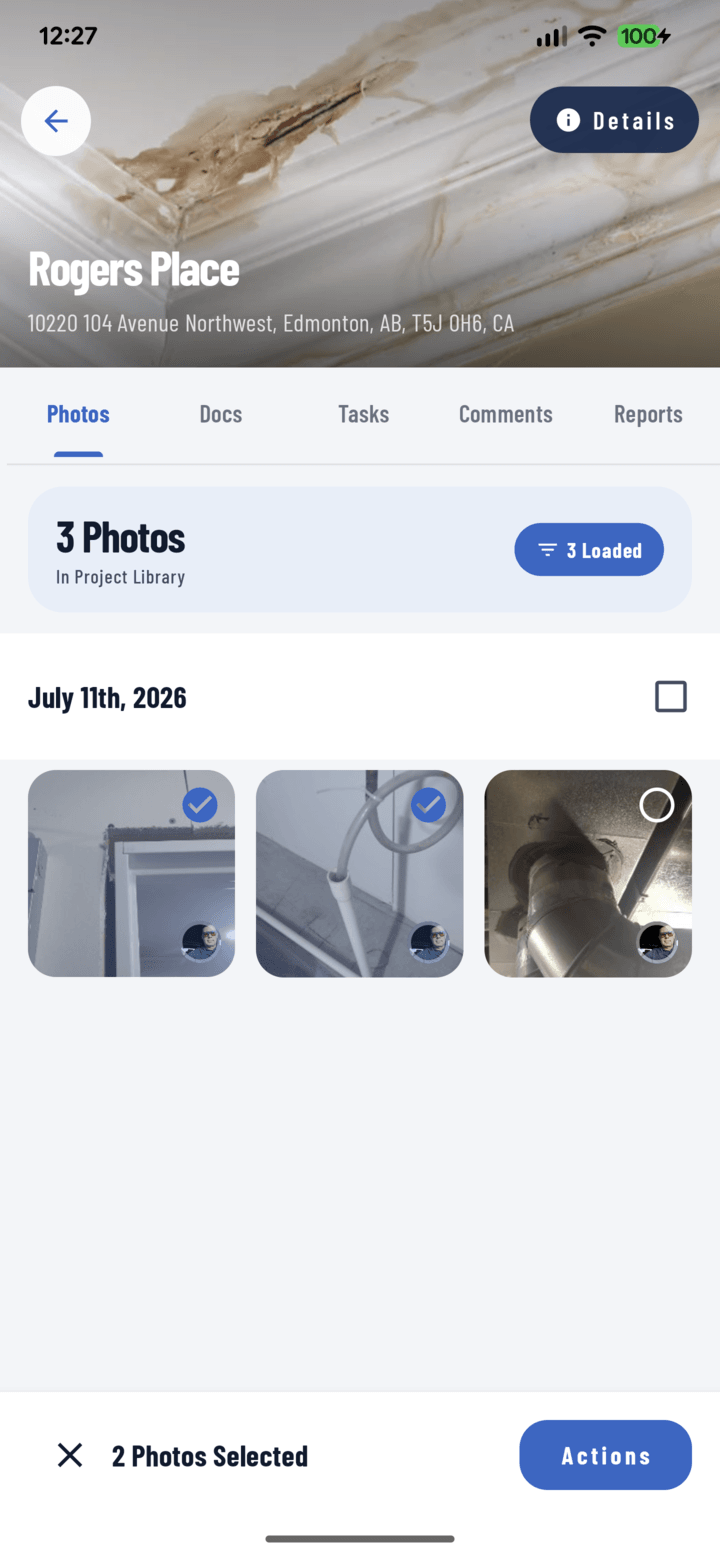
CrewBox Pro brings field and office workflows closer together
CrewBox Pro fits into the daily reality of roofing work: fast decisions, changing job site conditions, and teams that need simple access to project information. The value is not just “going digital.” The value is creating a more consistent way to capture, organize, and share the details that matter.
A practical roofing contractor software setup should help contractors manage project communication from the first site visit through completion. That may include notes, photos, task updates, job status, customer information, or reporting details, depending on how the company uses the system. When the process is centralized, the office does not have to keep interrupting crews for basic updates, and field teams do not have to wonder which message thread contains the latest instruction.
For roofers, simplicity matters. A roofer app should be easy enough to use on a busy job site, but structured enough to support professional project management. CrewBox Pro gives roofing teams a framework for cleaner communication and more organized job documentation without making the workflow feel heavier than the work itself.
How can roofing software improve daily operations?
Roofing software improves daily operations by helping teams standardize how they collect information, communicate updates, and track job progress. Instead of rebuilding the process for every project, contractors can use one system to guide repeatable steps and reduce avoidable confusion. The result is a workflow that is easier to manage, easier to review, and easier to scale.
Consider a typical day in a roofing business. A new service call comes in. A team member needs to understand the issue, schedule the visit, document the roof condition, capture photos, and report back clearly. If every step happens in a different place, the job becomes harder to control. With roofing service software, that same work can become more visible and organized.
A strong roofing app can support daily operations by helping teams:
Pre-install liability documentation
Walk the property once and capture time-stamped, GPS-tagged photos of every pre-existing crack, dent, and stain. When a homeowner claims your crew damaged the driveway, you pull up dated proof in seconds.
Markups & annotations
Circle the soft decking, arrow the flashing detail, and add measurements directly on the photo. Annotations are never burned in, so the original shot stays untouched for disputes and insurance claims.
A persistent visual record
Every tear-off, underlayment, and shingle course is filed to the right project automatically. Your whole install history is searchable by project, tag, and date — years after the crew moved on.
Final inspection sign-offs
Generate a branded PDF walking the client from before to after, capture their approval, and close the job with documentation the office can invoice against the same day.
Storm & insurance work
Hail hits, wind lifts, and leak trails photographed with GPS coordinates and timestamps give adjusters exactly what they need — fewer callbacks, faster approvals.
Capture job details consistently
Keep notes, photos, and updates attached to the relevant project instead of spread across personal devices.
Reduce back-and-forth communication
Give office staff and field crews a shared reference point for project status and next steps.
Support better customer updates
Make it easier to provide clear information when customers ask what has been completed or what happens next.
Improve accountability
Help managers see whether tasks have been handled, what still needs attention, and where follow-up may be required.
Create a cleaner project history
Preserve useful information for future repairs, warranty conversations, inspections, or repeat service.
The practical benefit is not only speed. It is confidence. When the team knows where information belongs, the entire project feels less reactive.
Better documentation leads to better decisions
Documentation is one of the most important habits in roofing, especially because roofs are difficult for customers to inspect on their own. Photos, notes, condition summaries, and job updates can help explain what was found, what was done, and why a recommendation makes sense. That is why roof report software is such a valuable part of a modern roofing workflow.
A well-organized roof report can support estimating, service work, repairs, maintenance planning, and customer communication. It can also reduce the risk of forgotten details. When a crew member documents damage, materials, access issues, or completed work while still on site, the information is usually more accurate than notes recreated hours later.
For commercial teams, documentation becomes even more important. Commercial roofing software often needs to support larger properties, multiple contacts, recurring maintenance, and more complex service histories. Even if a company starts with basic reporting needs, a consistent documentation process can help create a stronger foundation for future growth.
Good documentation also protects team time. Instead of asking, “Who has the photos?” or “What did the crew find?” managers can review the project record and move forward. That clarity helps roofers respond faster, quote more accurately, and communicate with less guesswork.
The best roofing apps support real field habits
Roofing apps only work when crews actually use them. That means the experience has to match the pace of the job site. Long forms, confusing screens, or overly complicated steps can discourage adoption, especially when a team is working around weather, equipment, safety requirements, and customer expectations.
The best workflows usually start with the essentials. A contractor may want crews to record arrival, capture photos, add notes, update status, and flag anything that needs office review. Once those habits are in place, the company can refine the process and add more structure where it truly helps.
A useful rollout checklist for any roofing software includes:
Define the information every job must include
Decide which details are required for estimates, reports, scheduling, and customer communication.
Keep field steps simple
Focus on what crews can realistically complete while on site.
Create naming and note standards
Consistent language makes project records easier to search, review, and understand.
Train office and field teams together
Everyone should know how updates flow from the job site to the back office.
Review early projects and adjust
Look for missing details, duplicate steps, or parts of the process that slow people down.
This approach helps avoid one of the most common software mistakes: trying to digitize a messy process without improving it. CrewBox Pro is most useful when it supports a clear workflow your team understands.
A connected process improves customer experience
Customers may not see every internal step of a roofing project, but they feel the results. When communication is slow or inconsistent, customers can become uncertain. When updates are clear, documentation is organized, and next steps are easy to explain, the experience feels more professional.
Roofing service software can help teams respond with better information. If a customer asks about progress, the office can look at the project record instead of waiting for a call back from the field. If a property manager needs documentation, the team can work from stored notes and photos instead of piecing together details after the fact.
This matters for both residential and commercial roofing work. Homeowners want reassurance that their property is being handled carefully. Commercial clients often need documentation for internal approvals, budgeting, compliance processes, or long-term maintenance planning. A connected roofing app can help contractors serve both groups with more consistency.
The customer experience also improves when teams sound aligned. When the estimator, crew, office, and project manager are all working from the same information, customers are less likely to hear conflicting answers. That alignment builds trust in small but important ways.
Choosing software that fits your roofing business
Not every roofing business needs the same system or the same level of complexity. A small repair-focused company may prioritize fast photo capture and simple job notes. A growing contractor may need stronger coordination across multiple crews. A commercial roofing company may care most about service history, reporting, and recurring maintenance workflows.
When evaluating roofing contractor software, look beyond feature lists and think about daily use. The right platform should help your team complete normal work with fewer gaps, not create another layer of administration. It should be practical for crews, useful for managers, and clear enough for the office to rely on every day.
CrewBox Pro is a strong fit for roofing teams that want a more organized, field-friendly way to manage project information. Whether you are looking for a roofer app for day-to-day updates or a broader roofing service software process, the most important test is whether the tool helps your people work with more clarity.
A smarter way to keep roofing projects moving
Roofing projects will always involve weather, site conditions, customer needs, and unexpected changes. The right roofing software will not remove every challenge, but it can make the work easier to coordinate and easier to understand. By bringing documentation, communication, and project visibility into a more organized workflow, CrewBox Pro helps roofing teams reduce friction where it matters most.For contractors comparing software for roofers, the best choice is the one your team can use consistently. Start with the daily problems that slow you down, build a simple process around them, and use CrewBox Pro to keep your roofing work clearer, more connected, and more professional from start to finish.
When evaluating roofing contractor software, look beyond feature lists and think about daily use. The right platform should help your team complete normal work with fewer gaps, not create another layer of administration. It should be practical for crews, useful for managers, and clear enough for the office to rely on every day.
CrewBox Pro is a strong fit for roofing teams that want a more organized, field-friendly way to manage project information. Whether you are looking for a roofer app for day-to-day updates or a broader roofing service software process, the most important test is whether the tool helps your people work with more clarity.
Built into every plan
- Time-stamped, GPS-tagged photos filed by project automatically
- Volume-key burst capture — shoot one-handed from the ladder
- Annotations and measurements that never destroy the original photo
- Before & after comparisons for tear-off and re-roof jobs
- Branded PDF reports generated on the phone, on the driveway
- Offline capture — rooftops and rural sites with zero signal
- Tags like #pre-install, #tear-off, #flashing applied before you shoot
- Tasks and punch lists with photo evidence for every crew member
The features roofers & exteriors lean on
Jobsite Camera
Burst capture with a volume key and a bubble level for straight before/after shots.
Learn more →Photo Annotation
Arrows, shapes, and measurements on damage photos — originals stay untouched.
Learn more →PDF Progress Reports
Branded condition and completion reports generated entirely on the device.
Learn more →Offline Mode
Capture on the roof with no signal; everything syncs when you're back in range.
Learn more →Frequently asked questions
How does CrewBox protect roofing crews from damage claims?
Every photo is automatically time-stamped and GPS-tagged the moment it's captured. Document the property's condition before setup, and if a client later claims your crew damaged something, you have dated, located proof of the pre-existing condition.
Can I use CrewBox on a roof with no cell signal?
Yes. CrewBox is offline-first: photos, notes, and annotations are saved locally the instant you capture them and sync automatically when your phone gets signal back.
Can I generate an inspection report on site?
Yes. Client-ready, branded PDF reports are generated entirely on your device — walk the homeowner through the finished job and send the sign-off report before you leave the driveway.

One place for every jobsite photo, task, and report. Set up in minutes and see the difference on your next job.
- 30 days free
- No credit card to get started
- Up and running in 5 minutes or less
- No sales calls (we promise)
- Free for solo crews
- iPhone, Android & web