
JOBSITE PHOTO DOCUMENTATION.FIELD CREW MANAGEMENT.
Every jobsite photo time-stamped, GPS-tagged, and filed to the right project automatically — even when there is no internet connection! Your whole job site, in your pocket.

One place for every jobsite photo, task, and report. Set up in minutes and see the difference on your next job.
- 30 days free
- No credit card to get started
- Up and running in 5 minutes or less
- No sales calls (we promise)
- Free for solo crews
- iPhone, Android & web
Sign up today and start using the most advanced jobsite photo app built for construction and field crews. 30 days free — no credit card required.
30-DAY FREE TRIAL · NO CREDIT CARD TO START · WORKS OFFLINE · iOS, ANDROID & WEB
Capture, collaborate, comment, communicate!
Everything you need to document, markup, and organize your work directly from the field.
Document every detail, straight from the field.
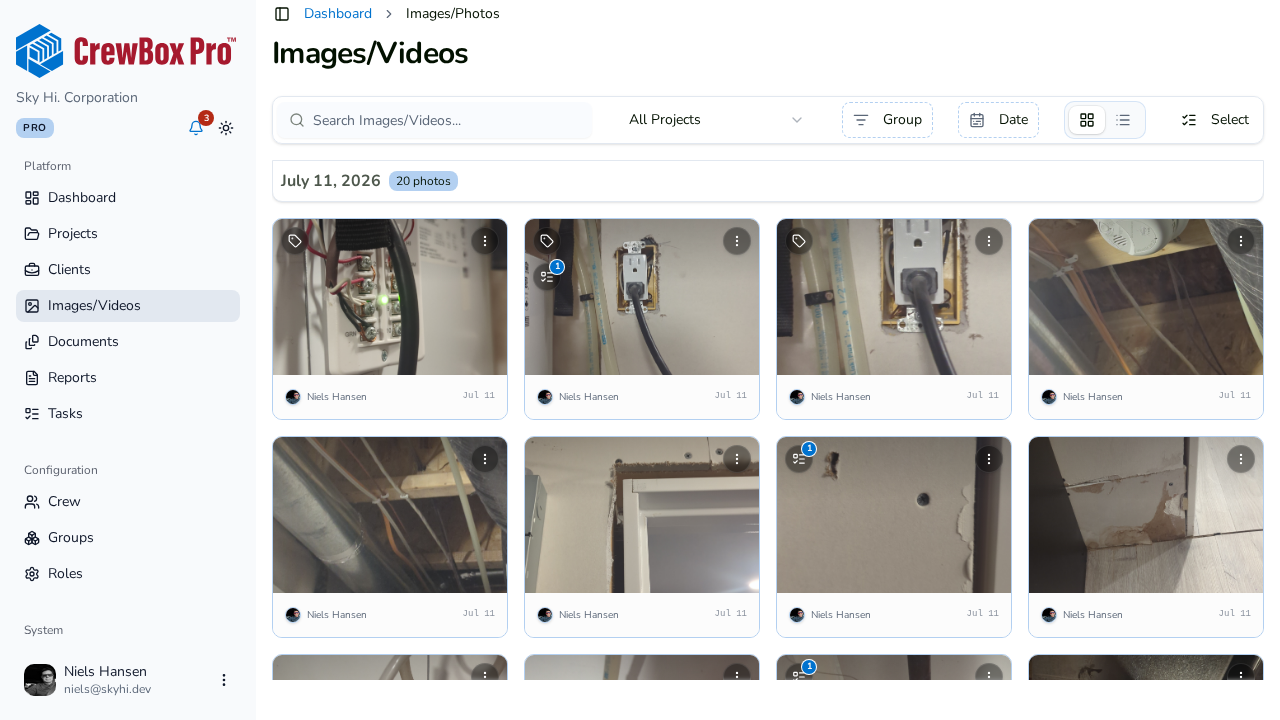
Snap timestamped, GPS-tagged photos and videos the moment work happens. CrewBox files each one under the right project, date, and location automatically — so nothing gets lost between the job site and the office.
- Timestamps and GPS baked into every capture
- Auto-organized by project, date, and crew member
- Browse all media across every job from one place
Keep your whole crew in sync.
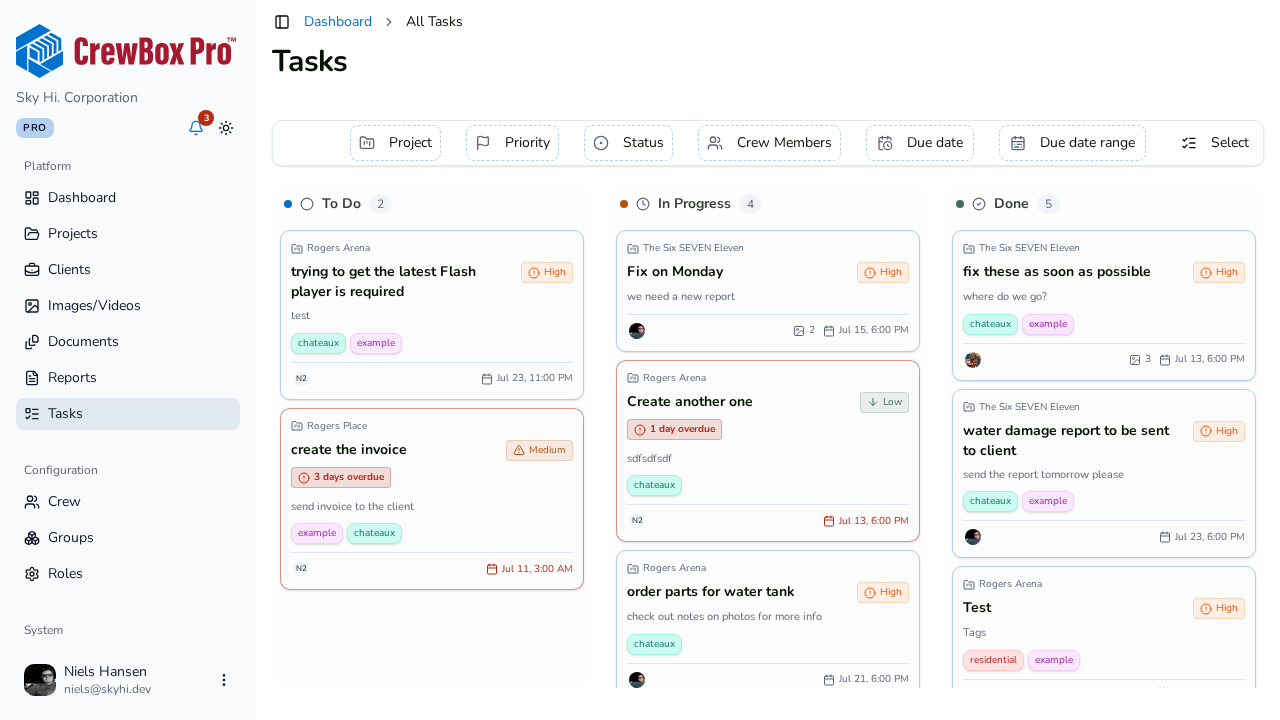
Assign photos, documents, and tasks to your team and track them on a live Kanban board. Everyone sees what's due, what's overdue, and what's done — from the field or the office.
- A Kanban board that spans every project
- Attach photos and documents to any task
- Due dates, priorities, and status at a glance
Mark it up and talk it out.
Draw arrows, add text, and drop measurements right onto the photo, then keep the conversation on the record with threaded comments and @-mentions that pull the right people in.
- Annotate photos with arrows, shapes, and text
- Threaded comments on projects and documents
- @-mention crew to bring them in instantly
- Measurements and callouts saved right on the image
- Original photo always preserved — markup is non-destructive
- Every markup and comment timestamped with who and when

Turn field work into client-ready proof.
Build branded PDF reports from your photos in minutes — cover pages, sections, captions, and your logo — then hand polished documentation to clients and inspectors that ends arguments before they start.
- Branded PDF reports from your job-site photos
- Cover pages, sections, headers, and footers
- Save as a document or reuse as a template
Working offline. Nothing lost.
How CrewBox keeps documenting the job when the signal drops — in four steps.

You're offline. The app keeps working.
The project opens as usual. An offline banner confirms every change is saved on the phone and will sync when you reconnect.

Shoot photos like nothing changed.
Take photos from the camera. Each one is time-stamped and GPS-tagged on the device and queued for upload.
Every photo is queued, not lost.
The project shows a Pending Sync list and a pending badge. Open the queue to review photos and upload them all at once.
Back online. Everything syncs.
Once the signal returns, uploads start automatically. Pending photos move into the project library.
No credit card needed · Free for Solo users · 30 days free
Everything a construction photo app should do.
Every job recorded. Every detail tracked.
Every photo time-stamped, GPS-tagged, and filed to its project automatically. A date-grouped timeline of the whole job, searchable in seconds.
- Auto-sorted into a date-grouped timeline
- Every photo tagged to its project and crew member
- Search the whole job history in seconds
- Nothing lost between the field and the office
Offline-first for real job sites.
No signal? Keep working. Capture, create, and comment offline; everything syncs the moment connectivity returns.
- Photos, tasks, and comments captured with zero signal
- Time stamp and GPS recorded on device, not on upload
- Pending items queue and sync automatically
- Nothing to remember, nothing to re-upload
Photo annotation and commenting
Circle the defect, arrow the leak, label dimensions in feet or meters. Markup stays editable and is never burned into the image.
- Arrows, circles, text, and freehand
- Dimensions in feet or meters
- Original photo always preserved
Construction progress reports
Branded, photo-rich PDF reports built on your phone. Share with clients and insurers in minutes, no office round-trip.
- Your logo, your colors, your cover page
- Time stamp and GPS on every photo
- Share by link, email, or text
Task management for your crew
Turn any photo into an assigned task with priority and due date. Your crew opens the app to overdue, due today, and next.
- Assign to a crew member with one tap
- Priority, due date, and photo attached
- Close-out photos prove the fix
Built for your crew.
No Sales person will call you
5 times a week to sign up.
We know how the competition is. As soon as you sign up, they are calling you in 5 minutes, and won't stop calling you until you buy. Our product speaks for itself — kick the tires and try it out. If you like it, then simply pay when you need to add all your crew members.
See full plan details- ✓All Features are available to you. No constant need to have to upgrade to the next package. Upgrade when your team grows or need more storage.
- ✓Free forever for solo crew members — no trial countdown
- ✓We provide you more seats out of the box for much less!
- ✓We use AI to build our Products, we don't need to force AI down your throat!
- ✓Set up in minutes — no onboarding calls or training seminars
Want to show our sales team some love?
They'd be thrilled to give you a personal demo — on your schedule, with zero follow-up pressure.
Book a DemoContinuous Upgrades, No Surprise Fees, We Promise!
Cancel anytime. See full plan details →
Solo
Try out CrewBox features for free.
- 50 Projects
- Just You
- Unlimited Storage
- Limited Support
Duo
Great for small partnerships and collaborative duos.
- Unlimited Projects
- 2 Users Included
- Unlimited Storage
- Standard Support
Starter
Perfect for small crews just getting started.
- Unlimited Projects
- 3 Users Included5 Included Now!
- Unlimited Storage
- Standard Support
Pro
Everything you need for growing businesses.
- Unlimited Projects
- 8 Users Included12 Included Now!
- Unlimited Storage
- Premium Support