
Construction photo documentation without the busywork
CrewBox handles construction photo documentation for you — it turns jobsite pictures into proof. Every photo is time-stamped, GPS-tagged, and filed under the right project the moment it’s captured — so the office and the field share one searchable record of the work. Snap it on site, mark it up, and hand clients a branded PDF report in minutes. It even works with no signal.
GPS + timestamp on every shot · Works fully offline · 30-day free trial · Free plan
Start Your Free Trial →$0 due today · No credit card to start · iOS, Android & web
- ✓ Time-stamped, GPS-tagged proof on every shot
- ✓ Every photo auto-filed to the right project
- ✓ Markup, measurements & tags right on the photo
- ✓ Works fully offline, syncs automatically
- ✓ Branded, client-ready PDF reports in minutes
Why crews trust CrewBox for construction photo documentation
A phone's camera roll was built for holiday snapshots. Construction photo documentation has one job: prove what the crew did, when they did it, and where — without anyone typing a word on site.
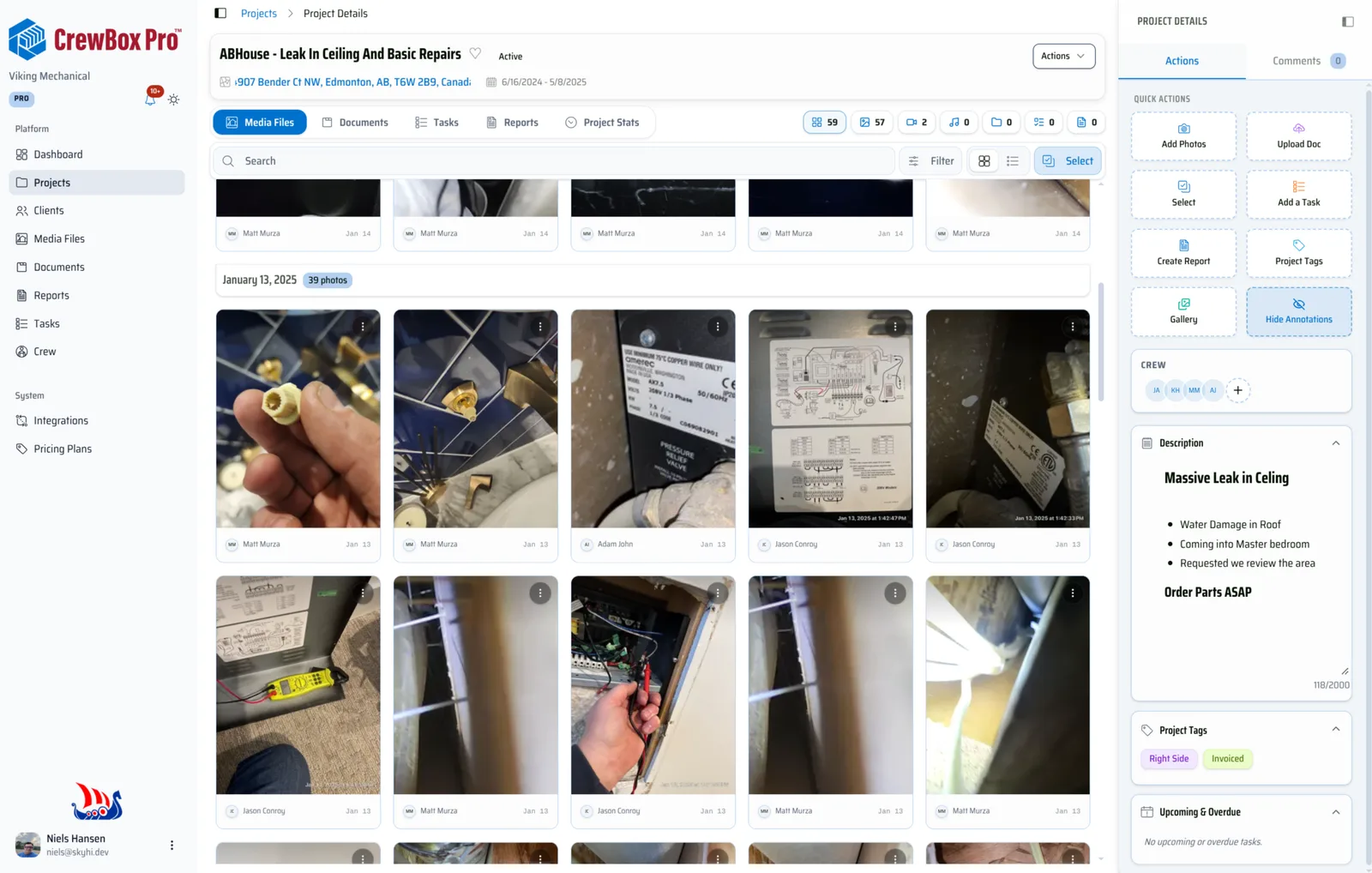
Capture on any jobsite
A purpose-built jobsite camera with volume-key burst capture, a bubble level, and tag-before-you-shoot. Glove-friendly, one-handed, and every photo lands in the right project instead of your camera roll.
Jobsite cameraOrganized automatically
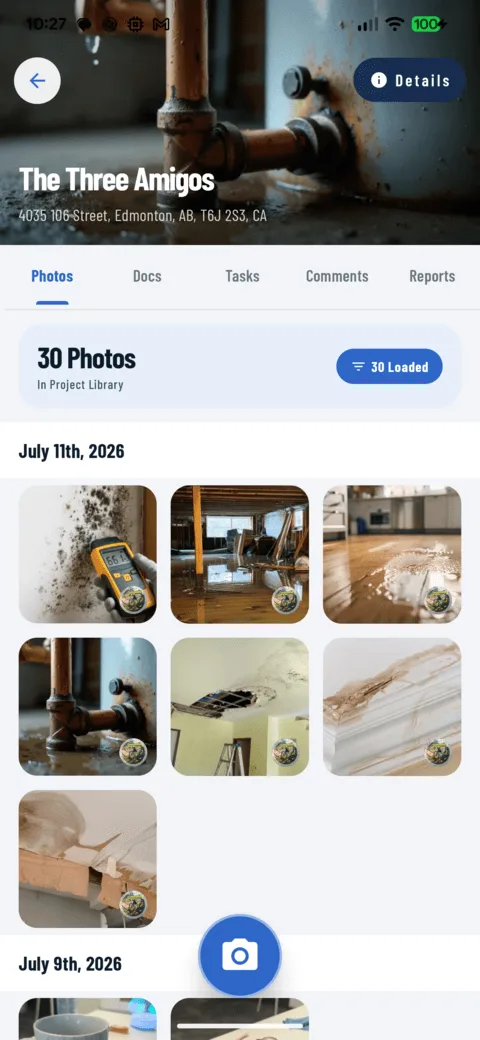
Time, date, GPS, and photographer attach to every capture — no typing. A date-grouped photo library makes any stage of any job searchable in seconds, across every project you have ever run.
Photo libraryReports in minutes
Turn a day's photos into a branded, client-ready PDF progress report generated entirely on the device — no desktop, no formatting, no waiting for the office to get to it.
PDF reportsWorks with no signal
Basements, new builds, remote sites — capture, tag, annotate, and comment fully offline. Everything queues on the phone and syncs automatically the moment a connection returns.
Offline modeSwitching from CompanyCam? Bring everything with you
It’s your data — years of jobsite history you paid to build, and you don’t have to abandon it to leave. We migrate crews from CompanyCam to CrewBox in a few hours: your photos, your tags, your comments, your pages, your documents and your videos land in CrewBox exactly how you had them, filed under the same projects, with the original timestamps and GPS data intact.
Contact support
Contact support and they will walk you through the steps to migrate your data. It’s your history — your projects, photos, videos, tags, comments, pages and documents — no hand exports, no zip files, no spreadsheet of filenames.
We rebuild it in CrewBox
Every project is recreated with its photos and videos in order — original timestamps and GPS intact, tags applied, comments threaded on the right photo, pages and documents filed where they were.
Crew signs in, keeps shooting
Install CrewBox, sign in, and the whole history is already there. Most teams are switched the same day — tomorrow’s photos just land in CrewBox instead.
Your data comes across — exactly how you had it
- Photos — with original timestamps and GPS data
- Videos — in the same projects, same order
- Tags — your whole tag vocabulary, still applied
- Comments — threaded on the photo they belong to
- Pages — recreated with their content in place
- Documents — plans, permits and contracts, filed per project
Done in a few hours · Nothing left behind · Keep CompanyCam until you’re sure
Capture — photos, video & markup on site
The part that happens with gloves on, in the rain, on one bar of signal. Every control is reachable with a thumb, and every shot is stamped with time, date, GPS and who took it — before it ever leaves the phone.
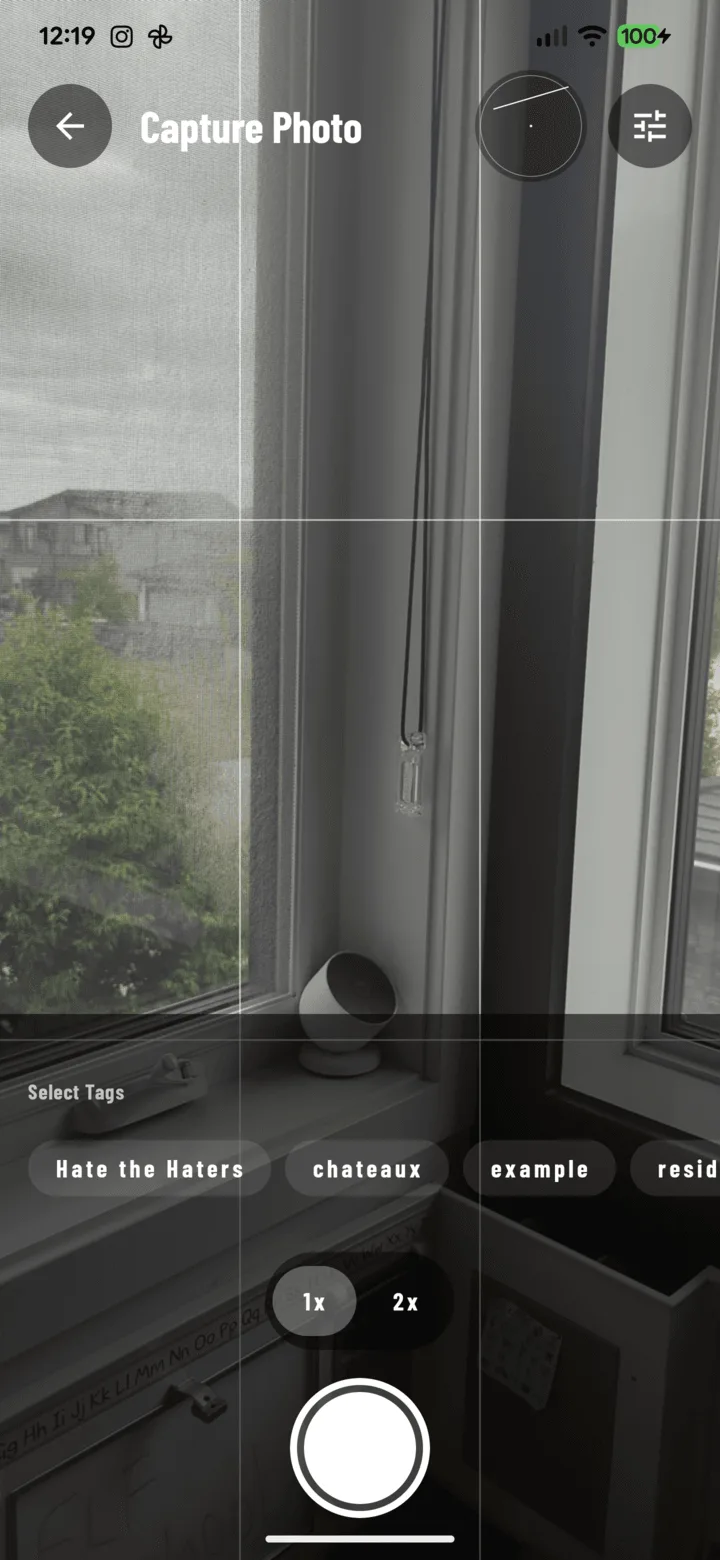
Hardware-button capture & burst
Press a volume key to shoot; hold it for burst mode — one shot every half second. On-screen shutter and pinch-to-zoom with 1x/2x quick pills included.
Straight, composed shots
A rule-of-thirds grid overlay and an accelerometer-driven bubble level keep photos straight and professional — both toggleable in camera settings.
Tag before you shoot
Select tag chips in the camera and every capture carries them automatically. GPS coordinates attach to every shot, so the photo can prove where it was taken.
15-second site videos
A dedicated video screen with a live timer records quick, focused clips of the thing that is hard to explain in stills — uploaded through the same background pipeline.
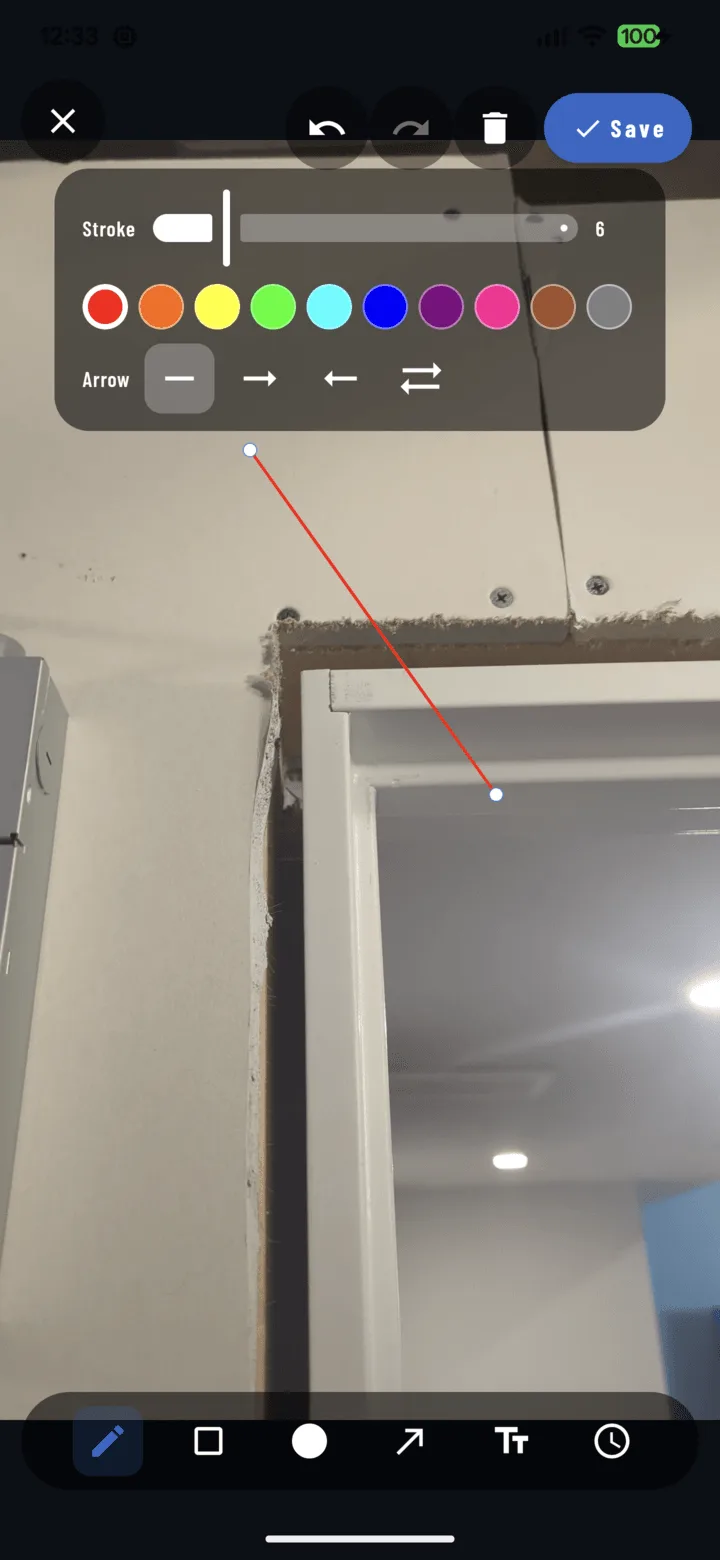
Markup that never burns in
Rectangles, circles, arrows, text and timestamps in twelve colors, with imperial and metric measurement labels. Vector markup stays editable — show original, annotated, or both in a report.
Organize — every photo filed where it belongs
The filing you never have to do. Photos land in the right project the moment they are taken, and the search makes nine months ago feel like this morning.
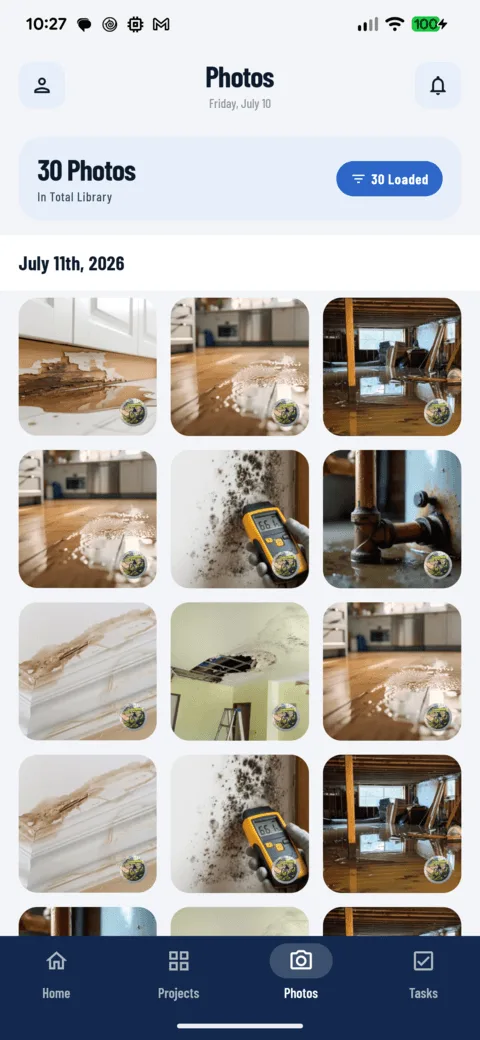
A library, not a camera roll
A searchable, cross-project photo history grouped by date. Filter by tag, crew member, media type or date range — then share, tag, move, print or report on a whole selection at once.
Projects & crews
Every photo, document, task and comment lives under one project. Verified address autocomplete, crew assignment, favorites, Near Me sorting — and projects can be created fully offline.
One tag vocabulary
The same tags work across projects, photos, documents and tasks — applied at capture or in bulk afterwards, filtered in any list, and carried straight into the client PDF.
Documents live with the job
Plans, permits and contracts stay on the project with built-in viewers for PDF, CSV, text and Office files. Comment on them, tag them, move them between projects.
A dashboard that starts the day
Your projects as a visual carousel and your tasks bucketed by urgency — past due, today, tomorrow. Swipe anywhere on Home to open the camera for your last project.
Act — turn photos into work that gets done
A photo of a problem is just a photo. CrewBox turns it into an assigned task with a due date, a thread where the answer stays attached, and a notification that lands in the right pocket.
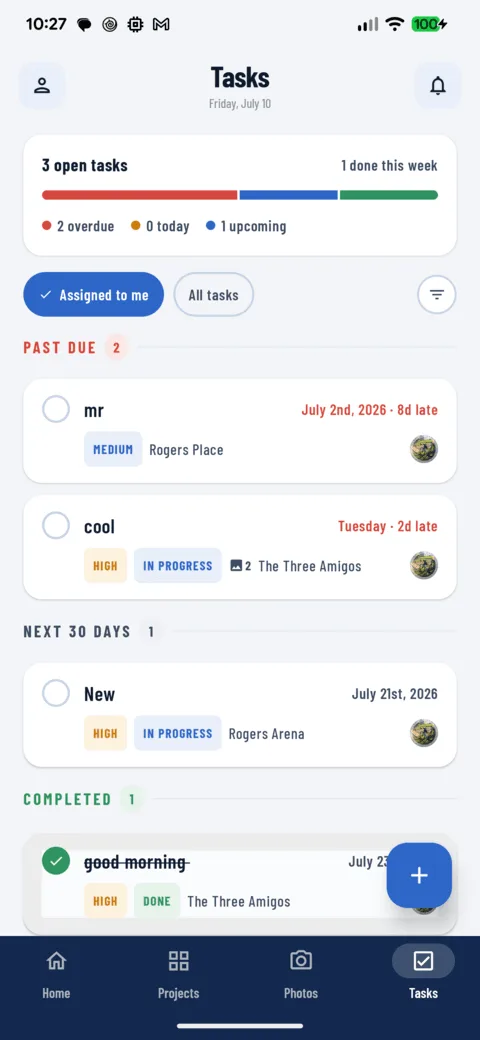
Photo-backed tasks & punch lists
Four priorities, due dates with live countdowns, single-tap completion, and photo evidence attached straight from the grid — so the fix is assigned before you leave the room.
Comments & @mentions
Threaded comments on projects, photos and documents, so the answer stays attached to the thing it is about. @Mentions notify and deep-link teammates; long-press an avatar to call, text or email.
A feed that deep-links
Mentions, task assignments and project activity sorted into tabs with unread counts. Every alert opens the exact photo, task or comment it is about — no hunting.
Fix a whole day at once
Select twenty photos and turn them into tasks, re-assign, re-status or re-tag in one action. The grid is built for bulk — punch-list day never produces just one item.
Deliver — proof the client can actually read
Nobody outside the crew wants a folder of 240 JPGs. They want six pages with your logo on them — and CrewBox builds those pages on the phone before you leave the site.
A branded PDF in minutes
Select the photos, pick a template, and a client-ready report comes out the other end — cover page, sections, headers and footers, two to four photos per page, captions you can edit.
Save it as a template
Any report becomes a reusable template, so next week’s update takes a minute. Choose whether each photo shows original, annotated, or both side by side.
Share, print & file it back
Native share sheets for photos, videos, documents and reports. Print through the system dialog, save to the gallery, or file the finished PDF back into the project as part of the permanent record.
Proof that holds up
Every photo in the report carries its timestamp and location, so the pages stand up with an adjuster, an inspector or an attorney — months after the crew has moved on.
“Before CrewBox my guys were texting me photos from four jobs at once and I couldn’t tell which was which. Now every shot lands on the right project on its own. I stopped losing hours hunting for pictures, and the crew stopped burning time standing around.”Adam
Try 30 days free · Free plan · No credit card needed

One place for every jobsite photo, task, and report. Set up in minutes and see the difference on your next job.
- 30 days free
- No credit card to get started
- Up and running in 5 minutes or less
- No sales calls (we promise)
- Free for solo crews
- iPhone, Android & web
Construction photo documentation for your trade
The camera is the same. What you have to prove is not — so the tags, templates, and report sections are set up differently depending on who is holding the phone.

Roofers & exteriors
Pre-install liability documentation, hail and storm damage markups, and final inspection sign-offs an adjuster will accept. Before-and-after proof that wins the supplement fight.
Roofing
Plumbers & pipefitters
Rough-in proof before the drywall goes up, water damage reports with timestamps an insurer can trust, and valve shutoff mapping you can find again in a panic.
Plumbing
Electricians
Panel wiring verification, NEC compliance evidence, and fixture progress across a whole floor without leaving the ladder. Tag every circuit photo to its room.
Electrical
HVAC technicians
Model and serial extraction from the nameplate photo, ductwork documentation, and client authorization sign-offs captured on the spot — before the parts order goes in.
HVAC
Landscapers & hardscapers
Before-and-after timelines that sell the next job, delivery proof for every yard of material, and grading logs by date for when the drainage question comes back.
Landscaping
General contractors
One shared record across every sub on the job, so the daily log writes itself, the change order has a photo attached, and nobody argues about who moved what.
All crewsStart free, upgrade when the crew grows
Document a real job on the free plan before you decide anything. No card, no trial countdown, nothing to cancel.
Solo
Try out CrewBox features for free.
- 50 Projects
- Just You
- 10 GB of Storage
- Camera, Tags & Annotation
Duo
Great for small partnerships and collaborative duos.
- Unlimited Projects
- 2 Users Included
- Unlimited Storage
- PDF Reports, Tasks & Offline Mode
Starter
Perfect for small crews just getting started.
- Unlimited Projects
- 5 Users Included
- Everything in Duo
- Whole-Crew Shared Record
Pro
For established crews that never want to think about limits.
- Unlimited Projects
- 12 Users Included
- Unlimited Storage
- Premium Support
Annual billing saves roughly 20% on every paid tier. See the full pricing page for annual rates, extra-seat costs, and the AI plan.
Try 30 days free · Free plan · No credit card needed
Construction photo documentation, answered
What crews want to know before they make the photo record automatic.
What is construction photo documentation?
What should a documentation workflow include?
How does CrewBox handle construction photo documentation?
Can crews document a site with no cell signal?
Does photo documentation help with disputes and claims?
Put construction photo documentation to work
Create an account, put one live job in it, and shoot tomorrow's work through CrewBox instead of the camera roll. If the report that comes out beats what you send today, move the crew over.
Not ready yet? Book a demo, see how migration works, or talk to our team.
Keep Reading
Comparisons, free tools and deep dives for crews deciding how to document their work.