
The Event Types
| You get notified when… | Example | Tab |
|---|---|---|
| Someone @mentions you in any comment | "@Sam is this ready for inspection?" on a photo | Mentions |
| A task is assigned to you | The PM hands you the flashing repair | Assignment |
| A task is taken off your plate | Work moved to another crew member | Assignment |
| Your tasks see activity | Status changes, updates, task comments | Tasks |
| Your content gets comments | Someone comments on a photo you took | All |
| Photos/documents move on your projects | Uploads, changes, and move-between-projects results | All |
All always contains everything — the other tabs are pre-filtered views of it.
How Each One Behaves When Tapped
Every notification deep-links to its subject:
- Mention on a photo → the photo opens with the comment panel up
- Task assignment → the task detail, attachments ready to view
- Photo activity → the media viewer
- Project events → the project
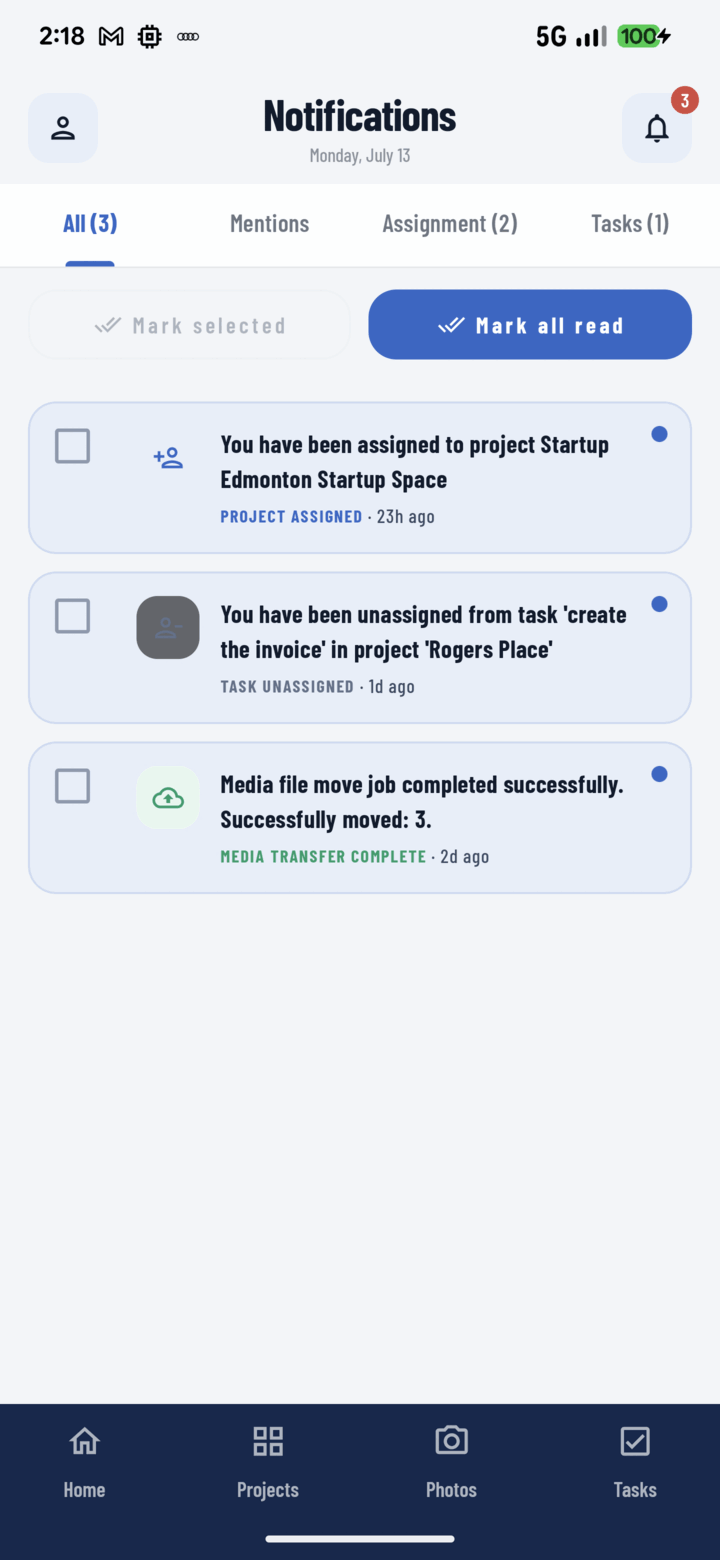
The All, Mentions, Assignment, and Tasks tabs group notifications; each card is labelled with its type.
No notification is a dead end — if its exact target is gone, it falls back to the relevant list instead of an error.
Reading the Counts
The bell badge is the total; each tab shows its own. Triage order that works: Mentions (someone's waiting on you) → Assignment (new work) → Tasks (status awareness) → All (skim).