
Getting There
Tap your avatar (top header) → Profile → Default Settings.
Every Setting and Where It's Used
Default project view
Options: All / My Projects / Favorites / Near Me / Recent
Used in: the project filter that Home and the Projects tab open on. A foreman who only works assigned jobs picks My Projects and never sees the rest; a service tech picks Near Me and the day starts sorted by distance; an owner picks All.
Default project tab
Options: Photos / Documents / Tasks / Comments / Reports
Used in: which tab every project opens to when you tap a project card. Photographers land on Photos; task-driven crews on Tasks; PMs who live in reporting land on Reports — skipping one swipe on every single project visit, all day.
New-task defaults
Options: status (To Do / In Progress / Done) · priority (Low / Medium / High / Urgent) · due date (None / Today / Tomorrow / One Week) · Assign to me toggle
Used in: the pre-filled state of every task you create — from the Tasks tab FAB, a project's Tasks tab, or the photo grid's Assign to Task action. With defaults tuned (e.g. To Do + Medium + Today + assign-to-me), creating a photo-backed task collapses to: select photos → Assign to Task → type title → Save. Every default stays overridable per task.
Project location defaults
Options: country (US/Canada) · city · state/province — labels adapt to the country
Used in: the Location section of every new project (create guide) — pre-filled before you type. A contractor working one metro area enters their city exactly once, ever.
Related Settings That Live on Profile (not in Default Settings)
- Dark mode, Language (EN/ES/FR live switch), Biometric login — see Profile.
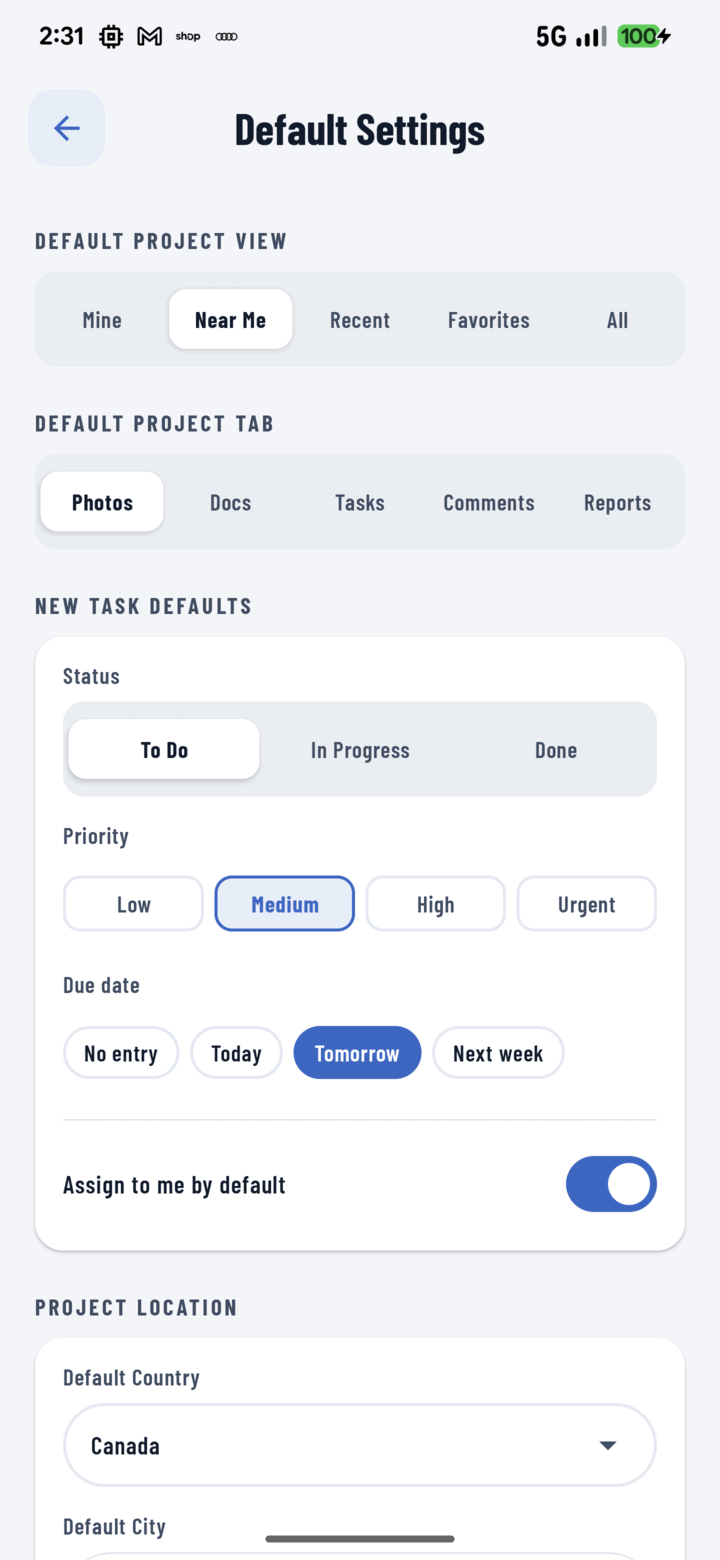
Default Settings presets your project view, opening tab, and the status, priority, and due date every new task starts with.
Notes
- Defaults persist across app restarts and updates (stored securely on the device).
- They're per-user — each crew member tunes their own.