
The filter bar
Both the project Tasks tab and the global Tasks page carry a composable filter bar — stack as many filters as you need:
- Priority — Low / Medium / High / Urgent.
- Status — Backlog / To Do / In Progress / Done.
- Crew Members — a searchable multi-select of assignees.
- Due-date preset and due-date range (below).
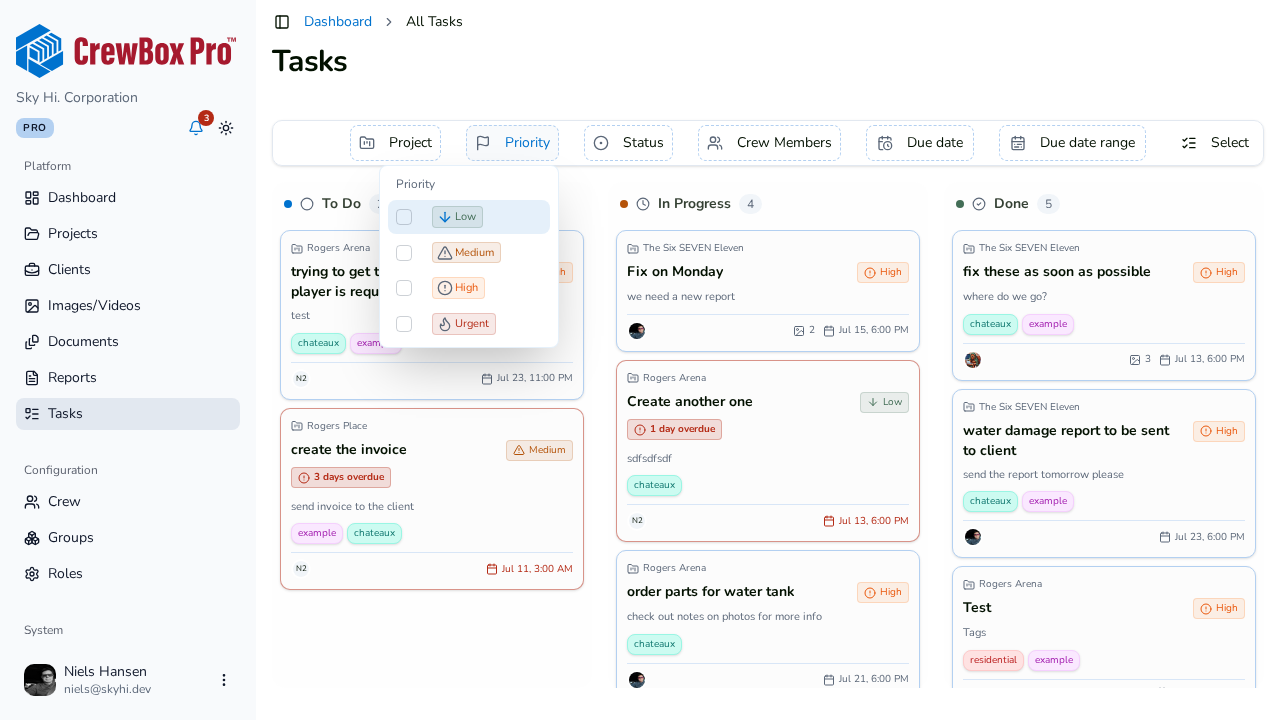
The global Tasks page adds a Project filter — a searchable multi-select — since it shows every task in the company.
Filter by deadline
The due-date preset gives one-click windows:
- Any — no due-date filtering.
- Past due — everything overdue.
- Due today
- Due this week
- Due this month
Need something custom? Use the due-date range to set exact start and end dates.
Useful combinations
- Past due + a crew member — what does this person owe us?
- Urgent + To Do — what must be dispatched first thing?
- Project + Due this week — the week's plan for one job.
Filters combine, and the board's column count pills update to reflect the filtered set.