
The three columns
The board has three columns — To Do · In Progress · Done — each with a colored header dot, a count pill, and a placeholder when empty. Tasks in Backlog status surface under To Do.
Move work by dragging
- Click and hold any task card.
- Drag it to the column matching its new status — a floating drag preview follows your cursor.
- Drop it. The status change applies optimistically (instantly); if the save fails, the card rolls back with a toast.
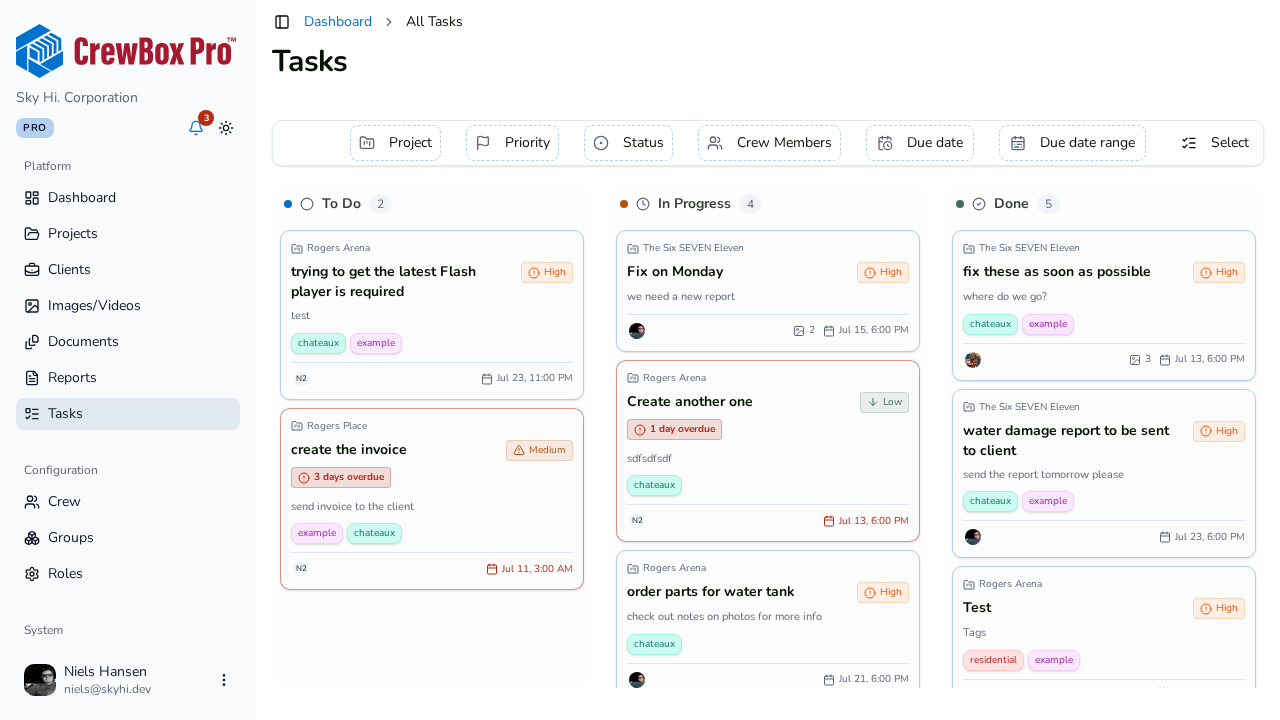
Read a task card
Each card packs the essentials:
- Project name (on the global board).
- Title and a description preview.
- Priority badge — Low / Medium / High / Urgent, each with a distinct icon and color.
- A red "N days overdue" badge when late — overdue cards also get a red border.
- Up to four tags.
- Assignee avatars (up to 3 plus overflow, with name tooltips; "Unassigned" when empty).
- Attached photo and document counts.
- The due date/time — red when overdue.
Open a task
Click any card to open it in the task editor dialog for full editing.
Where the board lives
The same board appears in each project's Tasks tab and on the global Tasks page covering the whole company.