
Open the global Tasks page
From the dashboard navigation, open Tasks (/o/dashboard/tasks). Every task in the company appears on one Kanban board — cards show their project name so you always know which job they belong to.
Compose your filters
The filter bar stacks however many filters you need:
- Project — a searchable multi-select of projects.
- Priority — Low / Medium / High / Urgent.
- Status — Backlog / To Do / In Progress / Done.
- Crew Members — a searchable multi-select of assignees.
- Due-date preset — Any / Past due / Due today / Due this week / Due this month.
- Due-date range — a custom date window.
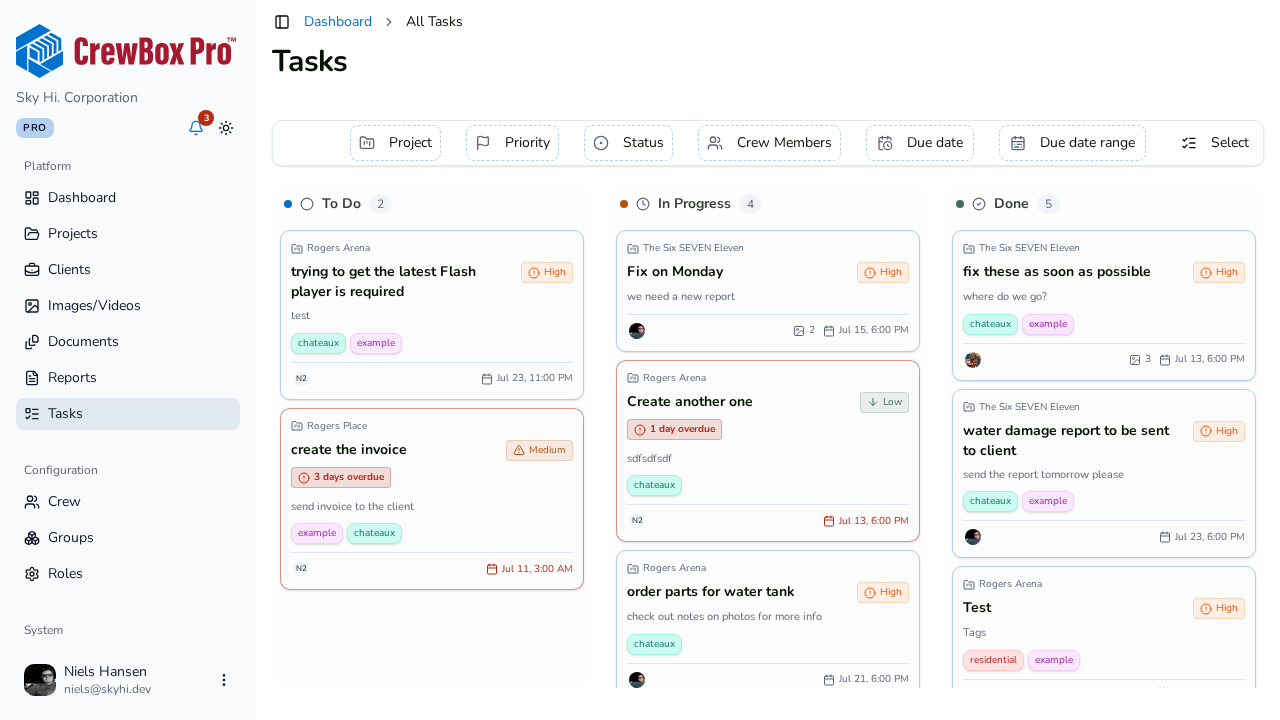
There's also a Select toggle for bulk actions across the filtered board.
Work from here
The global board behaves exactly like a project board: drag cards between columns to change status, and click a card to open the task editor dialog.
Empty and loading states
The page shows loading and error states, and when the company has no tasks yet: "No tasks yet — create a task from a project to see it here."